> ## Documentation Index
> Fetch the complete documentation index at: https://ai-kb.automationanywhere.com/llms.txt
> Use this file to discover all available pages before exploring further.
# Team SSO
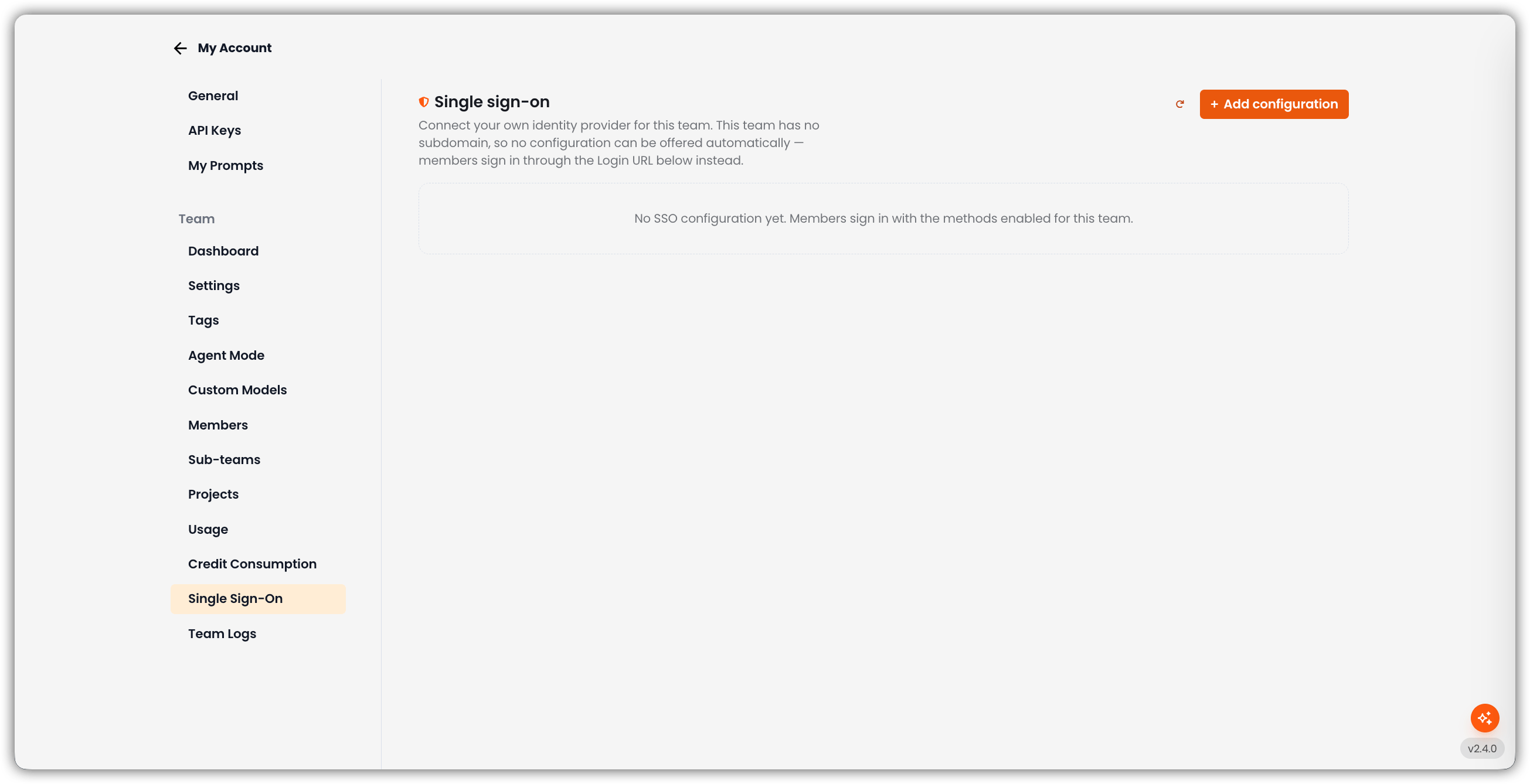
> Connect your own identity provider for a team or sub-team
Open **My Account → Single Sign-On** to attach this team's own SAML identity provider. You do not need a platform-wide SSO change from Automation Anywhere.
Only team admins can open this tab.
The header copy depends on whether the team has a subdomain:
* **With a subdomain:** the default configuration is offered automatically to anyone signing in on that subdomain.
* **Without a subdomain:** no configuration can be offered automatically — members sign in through the **Login URL** instead.
 ## Empty State
If there is no configuration yet: *No SSO configuration yet. Members sign in with the methods enabled for this team.*
Use **+ Add configuration** to create one. Refresh reloads the list.
## Team SSO vs. Platform SSO
| | **Platform SSO** | **Team SSO** |
| -------------- | --------------------------------------------------- | ---------------------------------------------- |
| Who configures | Typically Super Admin / AA Support | Team admin (and parent admins for descendants) |
| Scope | Organization / instance-wide patterns | One team (and how members reach that team) |
| Docs | [Single Sign-On (SSO)](/general/authentication/sso) | This page |
Team SSO configurations live separately from the app-wide SSO path so they are not mixed up with platform providers.
## Add a Configuration
The **New SSO configuration** form opens on the page.
| Field | Description |
| ---------------------------------------------------- | ---------------------------------------------------------------------------------------------------------------------------------------------------------------------- |
| **Name** | Label shown on the sign-in button (for example `Acme Okta`) |
| **Metadata URL** | Optional IdP metadata URL. You can upload the metadata XML instead after creating the configuration. |
| **Offer this configuration on the team's subdomain** | On only when the team has a subdomain **and** a metadata URL is set. Otherwise the control stays off — there is nowhere to offer it, or the sign-in button would fail. |
## Empty State
If there is no configuration yet: *No SSO configuration yet. Members sign in with the methods enabled for this team.*
Use **+ Add configuration** to create one. Refresh reloads the list.
## Team SSO vs. Platform SSO
| | **Platform SSO** | **Team SSO** |
| -------------- | --------------------------------------------------- | ---------------------------------------------- |
| Who configures | Typically Super Admin / AA Support | Team admin (and parent admins for descendants) |
| Scope | Organization / instance-wide patterns | One team (and how members reach that team) |
| Docs | [Single Sign-On (SSO)](/general/authentication/sso) | This page |
Team SSO configurations live separately from the app-wide SSO path so they are not mixed up with platform providers.
## Add a Configuration
The **New SSO configuration** form opens on the page.
| Field | Description |
| ---------------------------------------------------- | ---------------------------------------------------------------------------------------------------------------------------------------------------------------------- |
| **Name** | Label shown on the sign-in button (for example `Acme Okta`) |
| **Metadata URL** | Optional IdP metadata URL. You can upload the metadata XML instead after creating the configuration. |
| **Offer this configuration on the team's subdomain** | On only when the team has a subdomain **and** a metadata URL is set. Otherwise the control stays off — there is nowhere to offer it, or the sign-in button would fail. |
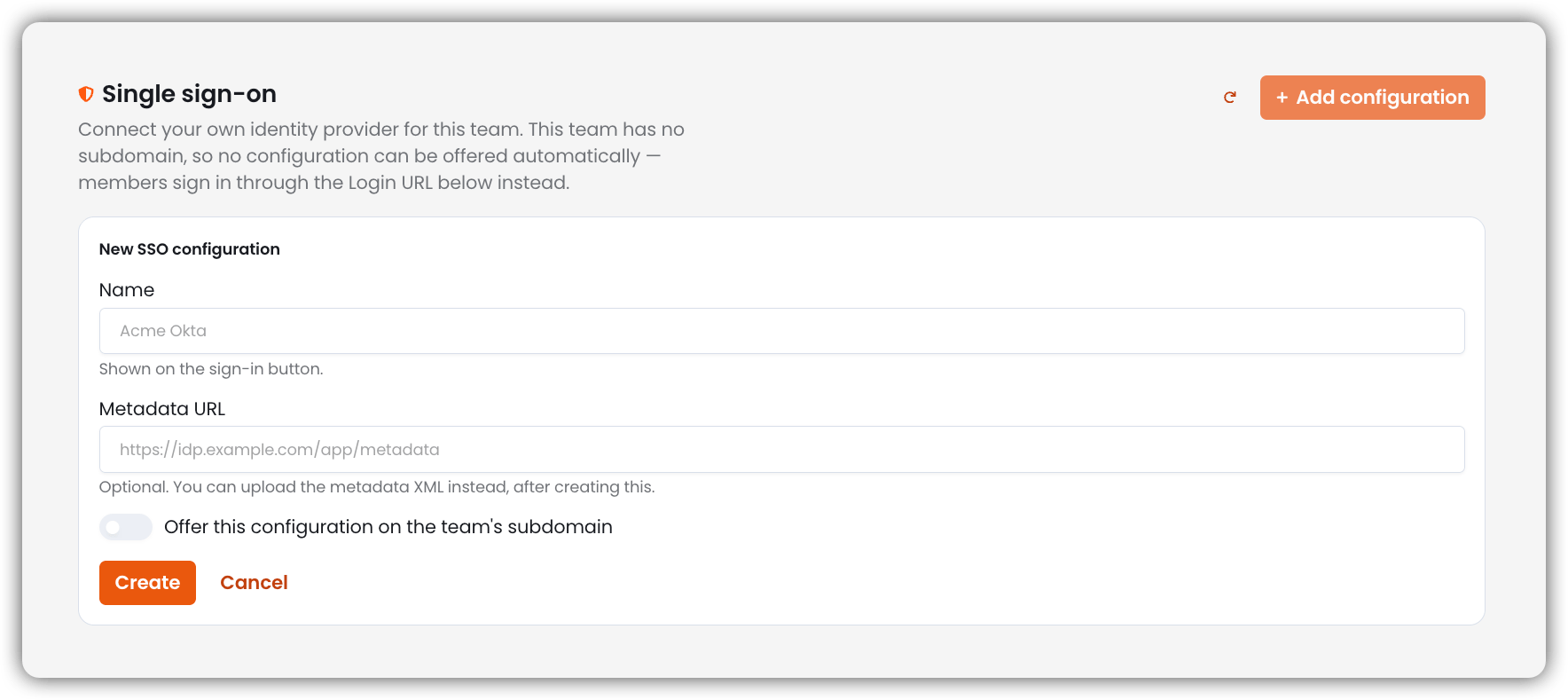 Click **Create**. **Cancel** closes the form without saving.
You can keep multiple configurations per team (up to **20**).
If this team is a sub-team, **Copy from parent team** appears. That makes an independent copy (new Entity ID and ACS URL). Register those values with your identity provider before anyone signs in. Later changes on the parent do not reach the copy.
## After You Create a Configuration
Copy these values into your IdP:
| Value | Use |
| ------------------------ | --------------------------------------------------------------- |
| **Entity ID (audience)** | SAML audience for this configuration |
| **ACS URL (reply URL)** | Assertion Consumer Service / reply URL |
| **Login URL** | Where members start SSO when subdomain auto-offer is not in use |
Each configuration gets its **own** ACS URL and audience so two teams pointing at the same IdP cannot replay one another's assertions.
You can then:
* Edit **Name** and **Metadata URL**
* **Upload metadata XML** (or **Replace metadata XML**)
* Toggle **Enabled**
* **Use on this team's subdomain** to make this the default (promoting one demotes the previous default)
* Delete the configuration
Badges on a card can include **Default**, **Disabled**, **Metadata missing**, and **Register with your IdP** (after copying from a parent, until you register the new SP with the IdP).
## Subdomain Behavior
| Situation | What members see |
| --------------------------------------------- | -------------------------------------------------------------------------------- |
| Team **has** a subdomain and a default config | That IdP can be offered automatically on the subdomain |
| Team **has no** subdomain | No automatic offer — use the configuration's **Login URL** |
| Default marked but no subdomain | The card notes that a subdomain is required for the default offer to take effect |
Subdomains for child teams are managed from [Sub-teams](/my-account/sub-teams).
## Who Can Manage Team SSO
| Actor | Can manage |
| ----------------- | -------------------------------------------- |
| Team Admin | This team's SSO |
| Parent Team Admin | This team **and** descendant teams' SSO |
| Super Admin | All teams (when acting with admin authority) |
| Editor / Member | No |
## Related
* [Sub-teams](/my-account/sub-teams)
* [Team Settings](/my-account/account-settings) (SSO-only login and domain auto-add)
* [Platform SSO](/general/authentication/sso)
Click **Create**. **Cancel** closes the form without saving.
You can keep multiple configurations per team (up to **20**).
If this team is a sub-team, **Copy from parent team** appears. That makes an independent copy (new Entity ID and ACS URL). Register those values with your identity provider before anyone signs in. Later changes on the parent do not reach the copy.
## After You Create a Configuration
Copy these values into your IdP:
| Value | Use |
| ------------------------ | --------------------------------------------------------------- |
| **Entity ID (audience)** | SAML audience for this configuration |
| **ACS URL (reply URL)** | Assertion Consumer Service / reply URL |
| **Login URL** | Where members start SSO when subdomain auto-offer is not in use |
Each configuration gets its **own** ACS URL and audience so two teams pointing at the same IdP cannot replay one another's assertions.
You can then:
* Edit **Name** and **Metadata URL**
* **Upload metadata XML** (or **Replace metadata XML**)
* Toggle **Enabled**
* **Use on this team's subdomain** to make this the default (promoting one demotes the previous default)
* Delete the configuration
Badges on a card can include **Default**, **Disabled**, **Metadata missing**, and **Register with your IdP** (after copying from a parent, until you register the new SP with the IdP).
## Subdomain Behavior
| Situation | What members see |
| --------------------------------------------- | -------------------------------------------------------------------------------- |
| Team **has** a subdomain and a default config | That IdP can be offered automatically on the subdomain |
| Team **has no** subdomain | No automatic offer — use the configuration's **Login URL** |
| Default marked but no subdomain | The card notes that a subdomain is required for the default offer to take effect |
Subdomains for child teams are managed from [Sub-teams](/my-account/sub-teams).
## Who Can Manage Team SSO
| Actor | Can manage |
| ----------------- | -------------------------------------------- |
| Team Admin | This team's SSO |
| Parent Team Admin | This team **and** descendant teams' SSO |
| Super Admin | All teams (when acting with admin authority) |
| Editor / Member | No |
## Related
* [Sub-teams](/my-account/sub-teams)
* [Team Settings](/my-account/account-settings) (SSO-only login and domain auto-add)
* [Platform SSO](/general/authentication/sso)